Basics
The whole idea first, then the terms the rest of this page uses.
1.1Whole idea
Server data, app-wide client state, data that must survive a restart, and short-lived screen state have different owners and different lifetimes. A single store for all of them forces you to rebuild caching and invalidation by hand, and every subscriber redraws when anything changes. Give each kind its own tool, and make selectors narrow.
Putting every kind of state in one global store makes one change redraw half the screen.
1.2Key concepts
One idea per card, in plain words.
Data owned by the backend. A query cache fetches, caches, retries and invalidates it for you.
Theme, session status, feature flags. Small, and owned by the app. Zustand or Redux Toolkit suit it.
Data that must survive the app being killed: the offline database and unsent changes. SQLite or MMKV.
A form field or a toggle. Local to a component, so useState or a form library holds it.
A function that picks the part of the store a component reads. A narrow selector redraws only when that part changes.
One update that redraws many components, because they read the whole store, or a selector returns a new array each time.
Two questions sort any piece of state. Who owns it: the server or the app? How fast does it change: rarely, or on every keystroke? The answers pick the tool.
A query cache shows the cached value at once and refetches in the background. It also deduplicates identical requests, so ten components asking for one resource send one call.
A store of many small pieces, as Jotai builds. A component subscribes to the piece it reads, so an update elsewhere does not redraw it.
At 60 fps each frame has about 16.7 ms. An inline object prop that breaks React.memo, a new function on every render, or a selector that returns the whole store each spends part of it on work nobody sees.
A Reanimated value that lives on the UI thread. Driving a scroll or press effect from it changes the screen without a React render.
Question
What exactly you must answer, and what to settle before you start.
2.1Question
A list screen redraws every row each time one row changes, and typing in a form feels slow. The team keeps API responses in a Redux store next to the form values. Find the causes and fix them.
2.2Clarify first
Each answer removes a guess.
| You ask | Answer |
|---|---|
| Where do the API responses live today? | In a global store, copied from each response, with hand-written loading and error flags. |
| How many components subscribe to that store? | Most screens, usually through broad selectors. |
Detailed answer
How it works, and how to build or explain it.
3.1The picture
Drawn for this page, at a size that reads on a phone.
3.2Step by step
The mechanism, in the order you would explain it.
- Sort the state
For each piece of state, ask who owns it, and how long it lives. The table below gives the usual answer.
- Move server data to a query cache
Delete the copied responses and the flags. The cache already tracks loading, errors and staleness.
- Keep the global store small
Only app-wide client state stays. Form values go back to the form.
- Narrow every selector
Select the one item a component draws. Don't return the whole store, and don't build a new array inside a selector without comparing contents.
- Remove unstable props
An inline object or function in a prop is new on every render, so memoised children redraw anyway. Create it once, or memoise it.
- Use a list built for scale
FlashList recycles a fixed pool of row views, where FlatList mounts and unmounts them. Pair it with stable keys and flat rows.
- Move animations to the UI thread
Animations that change layout as a finger moves belong in Reanimated worklets, outside the JS thread.
3.3Where each kind of state lives
| Kind | Typical tool | Survives a restart? | Who clears it |
|---|---|---|---|
| Server state | TanStack Query, RTK Query | Optional | The query layer |
| Client state | Zustand, Redux Toolkit, Context | Usually not | The store |
| Persisted device state | SQLite, WatermelonDB, MMKV | Yes | A migration you write |
| Ephemeral state | useState, React Hook Form | No | The component unmounting |
| Navigation state | The navigation library, owned by the system navigator | Sometimes, if you restore it | The navigator, as screens pop |
3.4Code
Working code for the core of it.
Counting re-renders
A small store with selector subscriptions. The tests use it to show how many components redraw for one change.
1/* A tiny store with selector subscriptions, to count re-renders the way a UI library would. */2type Equal<T> = (a: T, b: T) => boolean;3 4export function createStore<S extends object>(initial: S) {5 let state = initial;6 const subs = new Set<{ run: () => void }>();7 return {8 get: () => state,9 /** Replace part of the state, then tell only the subscribers whose selected value changed. */10 set(patch: Partial<S>) {11 state = { ...state, ...patch };12 subs.forEach((s) => s.run());13 },14 subscribe<T>(selector: (s: S) => T, onChange: (value: T) => void, equal: Equal<T> = Object.is) {15 let last = selector(state);16 const sub = {17 run() {18 const next = selector(state);19 if (!equal(last, next)) {20 last = next;21 onChange(next);22 }23 },24 };25 subs.add(sub);26 return () => subs.delete(sub);27 },28 };29}30 31/** For selectors that build a new array each time, so the contents decide whether anything changed. */32export const shallowEqualArray = <T>(a: T[], b: T[]) => a.length === b.length && a.every((x, i) => Object.is(x, b[i]));if (!equal(last, next))- A subscriber is told only when what it selected changed. Selecting the whole store always changes, so every subscriber redraws.
Object.is- The default comparison is identity. A selector that returns a fresh array fails it on every update.
shallowEqualArray- Comparing contents fixes the new-array selector, and an unrelated change then redraws nothing.
Tested by npm run test:modules.
3.5Slides
From the source decks this page draws on. Swipe, use the arrows, or press the left and right keys. Notes flag where a slide's numbers or flow differ from this page.
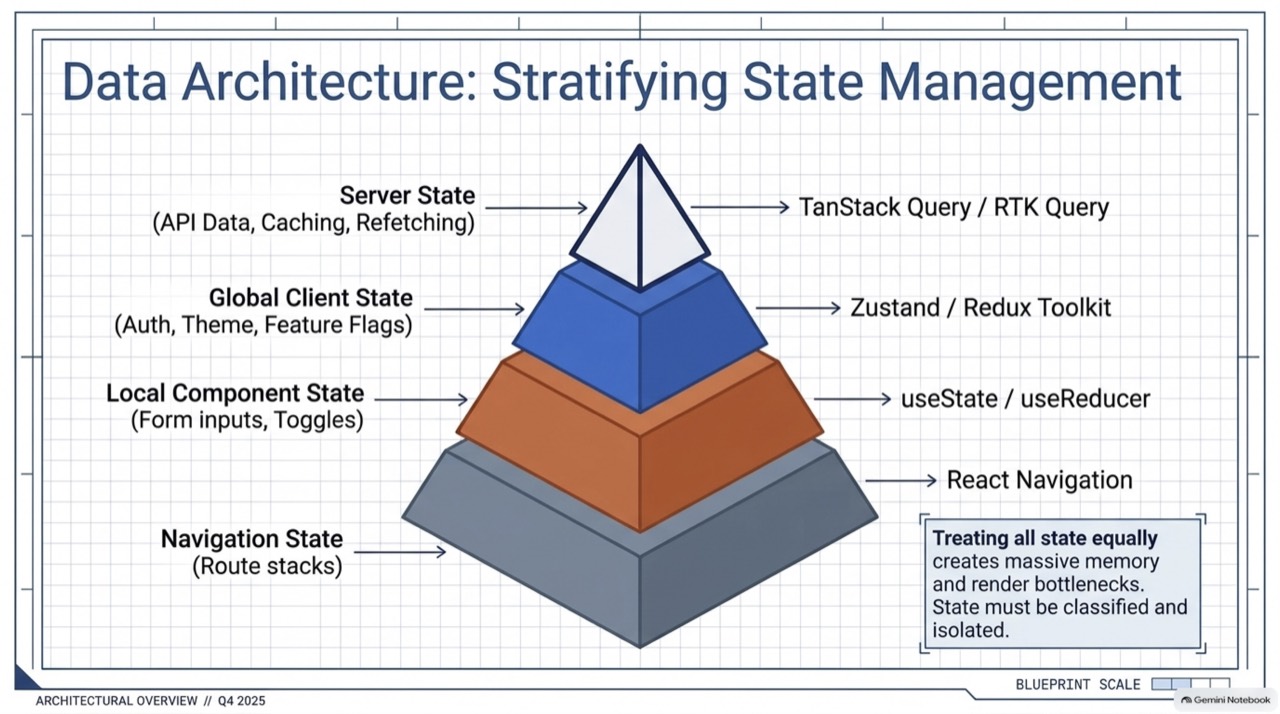
Four kinds of state, each with its own tool.
- Four kinds of state, each with its own tool.
- The same sorting as a matrix, with the anti-pattern called out.
- The same four kinds of state on two axes: who owns it, and how fast it changes.
- Which library suits which kind of state, and why.
- One update, fifty redraws, caused by a broad selector.
- FlatList churns views as rows scroll. FlashList recycles a fixed pool.
- Three anti-patterns and their fixes.
- Stop treating all data the same: four classes, four homes.
- Three global stores, compared by mechanism and fit.
- Three habits that spend the frame budget, and the Reanimated shared value that skips the JS thread.
- FlatList churns views. FlashList recycles them.
- Two sensible stacks, chosen by team size and compliance needs.
Q&A
What interviewers ask next. Answer out loud, then open.
4.1Interview questions
Redux or Zustand?
Why not keep API data in the global store?
Which selector patterns cause storms?
What does the persisted queue have to do with state kinds?
When do you pick Redux Toolkit, and when Zustand or Jotai?
What is the one mistake behind most render storms?
What would make you choose MobX?
Which three habits most often break the frame budget?
Extra depth
Edge cases, counterpoints and what to read next.
5.1Edge cases and counterpoints
Includes the strongest argument against this approach.
Show detailsHide details
- Context providers
- A provider holding a fast-changing value redraws every consumer. Split it, or move the value into a store with selectors.
- Measure first
- Use the profiler's render counts to find the real storms. Memoising everything adds cost and hides little.
- Counterpoint
- For a small app, one store is fine. The sorting pays off when the app and the team grow.
- Why a quadrant
- Plotting state by who owns it and how fast it changes shows the anti-pattern. Server state is owned by the backend and goes stale, so it belongs in a cache. Putting it in the client store gives it the wrong owner.
- List recycling in detail
- FlatList unmounts and remounts rows, which costs communication with native code on each scroll. FlashList reuses view instances, mapping closer to native collection views. Gains of several times show up on data-heavy lists, but measure yours.