Basics
The whole idea first, then the terms the rest of this page uses.
1.1Whole idea
The old bridge sent JSON messages between JavaScript and native code, one batch at a time. The New Architecture lets JavaScript hold direct references to native C++ objects through JSI, so calls can be synchronous with nothing to serialise. Fabric draws the screen through the same C++ core, and TurboModules load native modules when first used, not at launch. The thread rules did not change: keep the JS thread and the UI thread free.
Most older React Native advice is about the bridge. Knowing what replaced it shows which advice still holds.
1.2Key concepts
One idea per card, in plain words.
Queued, asynchronous JSON messages between JavaScript and native. Every call paid for serialising and for waiting its turn.
A C++ layer that lets JavaScript call native functions directly and hold references to native objects. It is the base for everything below.
The renderer. It builds the view tree in C++, computes layout with Yoga, and can give urgent work such as touches priority over background renders.
Native modules with a typed spec. Codegen turns the spec into native glue, and a module loads on first use.
The JavaScript engine React Native ships. It runs precompiled bytecode, which helps startup.
The JS thread runs your logic and React. The UI thread draws views and takes touches. Layout work happens off both. Native modules do I/O on their own threads.
With JSI, a large ArrayBuffer (an image, a key, rows from a database) can be shared by reference between JavaScript and C++ instead of being turned into JSON. Strings and plain objects still convert, so the saving is for binary data.
A small function that Reanimated runs on the UI thread. A gesture or layout animation written as a worklet keeps moving while the JS thread is busy.
Where Yoga computes layout before the result is handed to the UI thread. It is the fourth track beside UI, JavaScript and native modules.
Question
What exactly you must answer, and what to settle before you start.
2.1Question
Cold start on mid-range Android is 3 seconds, and a feed drops frames. The team is on the old architecture and asks whether upgrading will fix it. What do you say?
2.2Clarify first
Each answer removes a guess.
| You ask | Answer |
|---|---|
| Which React Native version, and which engine? | Version and engine decide which options exist. New projects default to the New Architecture, and some libraries still need updates. |
| Where does the time go today? | Unknown. Measure first, because an upgrade fixes only the parts that came from the bridge. |
| Which native modules does the app load at launch? | Many of them, mostly for features that sit on later screens. |
Detailed answer
How it works, and how to build or explain it.
3.1The picture
Drawn for this page, at a size that reads on a phone.
3.2Architecture
The components and how they connect.
3.3Step by step
The mechanism, in the order you would explain it.
- Measure before changing anything
Record cold start and dropped frames on a mid-range phone. Without a number, you can't tell whether the upgrade helped.
- Check your libraries
Each native library must support the New Architecture, or run through the interop layer. Find the ones that don't before you switch.
- Turn it on
Follow the release notes for your version. Treat it as a migration with a test pass, and not as a flag.
- Make module setup lazy
TurboModules load on first use, so keep their constructors cheap and move setup to the first call.
- Keep animation off the JS thread
Run animations that follow a finger as Reanimated worklets on the UI thread. Then a busy JS thread can't stutter them.
- Measure again
Compare startup and frame rate with step 1. Report what changed, and what didn't.
3.4Numbers you will hear
Many figures circulate in blog posts and slide decks. Here is how far to trust the common ones.
| Claim | What holds | What to do |
|---|---|---|
| The old bridge cost 50 to 100 ms per call | Serialising and queueing added real delay, but this isn't a per-call figure, and it varied with load. | Measure your own call counts on the old and new setup. |
| JSI is 40 times faster | A synthetic call benchmark. Real gains depend on how many calls you make. | Don't quote it. Count calls on your hot paths. |
| TurboModules cut startup by 44%, from 3.2 s to 1.8 s | Lazy loading does help. We found no primary source for this figure, and the gain depends on how many modules you load. | Trace your own startup, as in the startup module. |
| Fabric scrolls at 55 to 60 fps, the old renderer at 30 to 45 | Better scheduling does help. The ranges come from one demo, and your frame rate depends on the list, the row cost and the device. | Record dropped frames on a mid-range phone before and after, as in step 1. |
| Hermes V1 is the default engine from version 0.84 | Hermes has been the default engine for years. How far the newer Hermes V1 generation has rolled out depends on your version. | Read the release notes for the version you ship. |
3.5Code
Working code for the core of it.
What lazy module setup changes
Eager setup runs every native module before the first screen. Lazy setup runs only what that screen needs. This counts the work, so you can see where it goes.
1/* A model of what lazy native modules change at startup. It counts work; it does not run React Native. */2export interface NativeModule {3 name: string;4 /** milliseconds to initialise on a mid-range phone */5 initMs: number;6 /** the first screen cannot draw without it */7 needsFirstScreen: boolean;8}9 10export type Mode = "eager" | "lazy";11 12/** Eager init runs everything before the first screen. Lazy init runs only what the first screen needs. */13export function startup(modules: NativeModule[], mode: Mode) {14 const sum = (list: NativeModule[]) => list.reduce((total, m) => total + m.initMs, 0);15 const blockingMs = sum(modules.filter((m) => mode === "eager" || m.needsFirstScreen));16 return { blockingMs, deferredMs: sum(modules) - blockingMs };17}18 19/** Lazy work isn't removed. The first caller pays for it, so a module used on the second screen moves its cost there. */20export function firstUseCost(modules: NativeModule[], mode: Mode, name: string): number {21 const m = modules.find((x) => x.name === name);22 if (!m) throw new Error(`no module named ${name}`);23 return mode === "eager" || m.needsFirstScreen ? 0 : m.initMs;24}mode === "eager" || m.needsFirstScreen- Eager setup blocks on everything. Lazy setup blocks only on modules the first screen cannot draw without.
deferredMs: sum(modules) - blockingMs- The rest isn't removed. It is paid later, by whoever first uses each module.
firstUseCost- A module used on the second screen moves its cost there. Know the number, since users feel it as a pause.
Tested by npm run test:modules.
3.6Slides
From the source decks this page draws on. Swipe, use the arrows, or press the left and right keys. Notes flag where a slide's numbers or flow differ from this page.
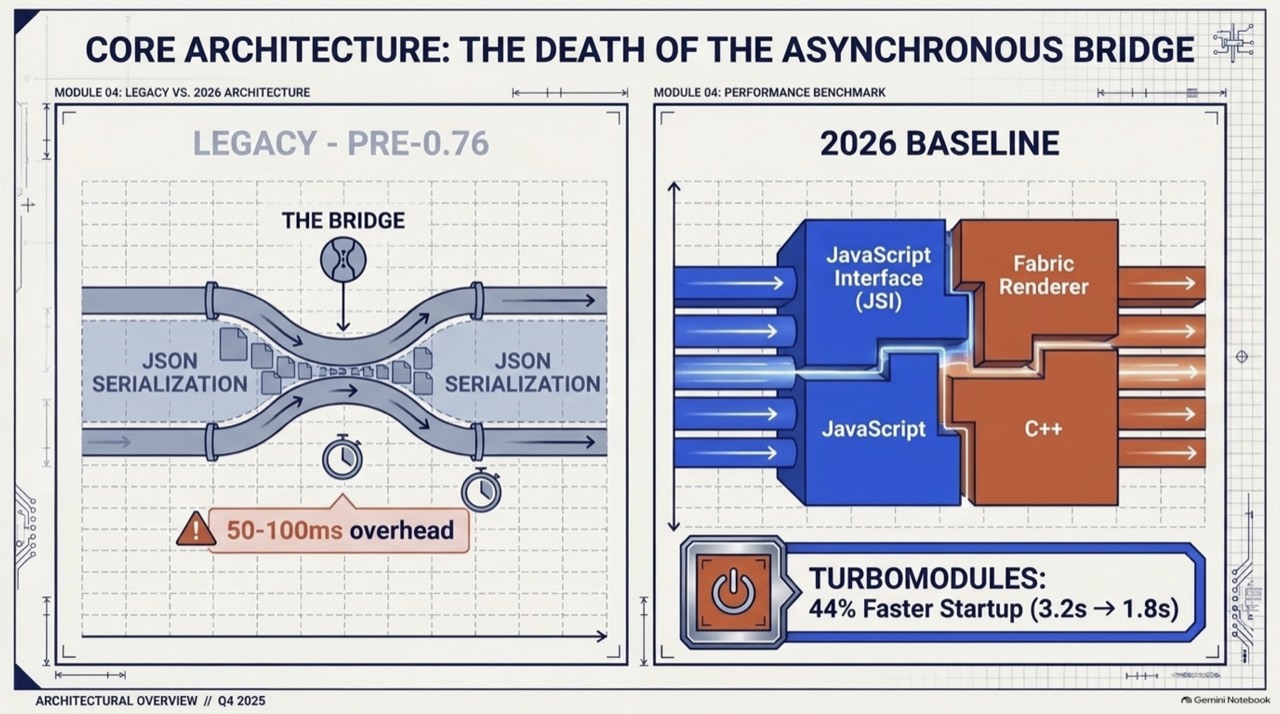
Legacy bridge on the left, JSI and Fabric on the right.The headline figure on this slide is a circulating claim. See the table above before quoting it.
- Legacy bridge on the left, JSI and Fabric on the right.
- Why serialisation was the bottleneck, and what direct calls change.
- The four threads over 80 ms. The animation runs on the UI thread, outside JS.
- The JS, UI and native threads, and what each handles.
- Everything loaded at launch, against core modules first and the rest on demand.
- Direct bindings let JavaScript read the local database without a bridge.
- The four parts of the current runtime, and what each is said to buy.
- Bridge against JSI, row by row.
- JavaScript holds a direct reference to a C++ object, and large binary data can be shared without copying.
- What each of the four threads does, and the animation rule.
- A toll gate against a shared memory pool, and the defaults the deck lists.
Q&A
What interviewers ask next. Answer out loud, then open.
4.1Interview questions
Does the New Architecture make an app fast by itself?
Why is a synchronous native call risky?
What does codegen buy you?
If lazy loading removes startup work, where did it go?
What does 'zero copy' mean, and where does it stop?
Which threads can block a frame?
Extra depth
Edge cases, counterpoints and what to read next.
5.1Edge cases and counterpoints
Includes the strongest argument against this approach.
Show detailsHide details
- Library support
- Check each native dependency before upgrading. An unmaintained library is the usual blocker.
- Debugging tools
- Tooling changes between versions. Use the debugger and profiler that your React Native version documents.
- Counterpoint
- A team with a stable app and no performance complaints may do better spending the migration time elsewhere. The upgrade eventually arrives anyway, as support for the old path ends.
- Bridge against JSI, row by row
- Communication moves from queued JSON to direct C++ references. Modules move from loading at startup to loading on first use. Rendering moves from batched updates to priority-based scheduling, so a touch can jump ahead of a background render. The slides show each row.